
Entering Isotopic Measurements
All input data for the Exploration module is centralized in the configuration panel (left column). This page describes each field, its expected unit, and its impact on calculations, so you can enter only what you have measured without any workflow blockers.
General Principle: Partial Entry Supported
You do not need to fill in every field to get results. The engine only activates the sub-modules for which at least one value is available. For example, if you only have values for δ34S and 206Pb/204Pb, only the Distality tab will be calculated.
Start with the measurements you have. Each additional value enriches the global score and deposit matches.
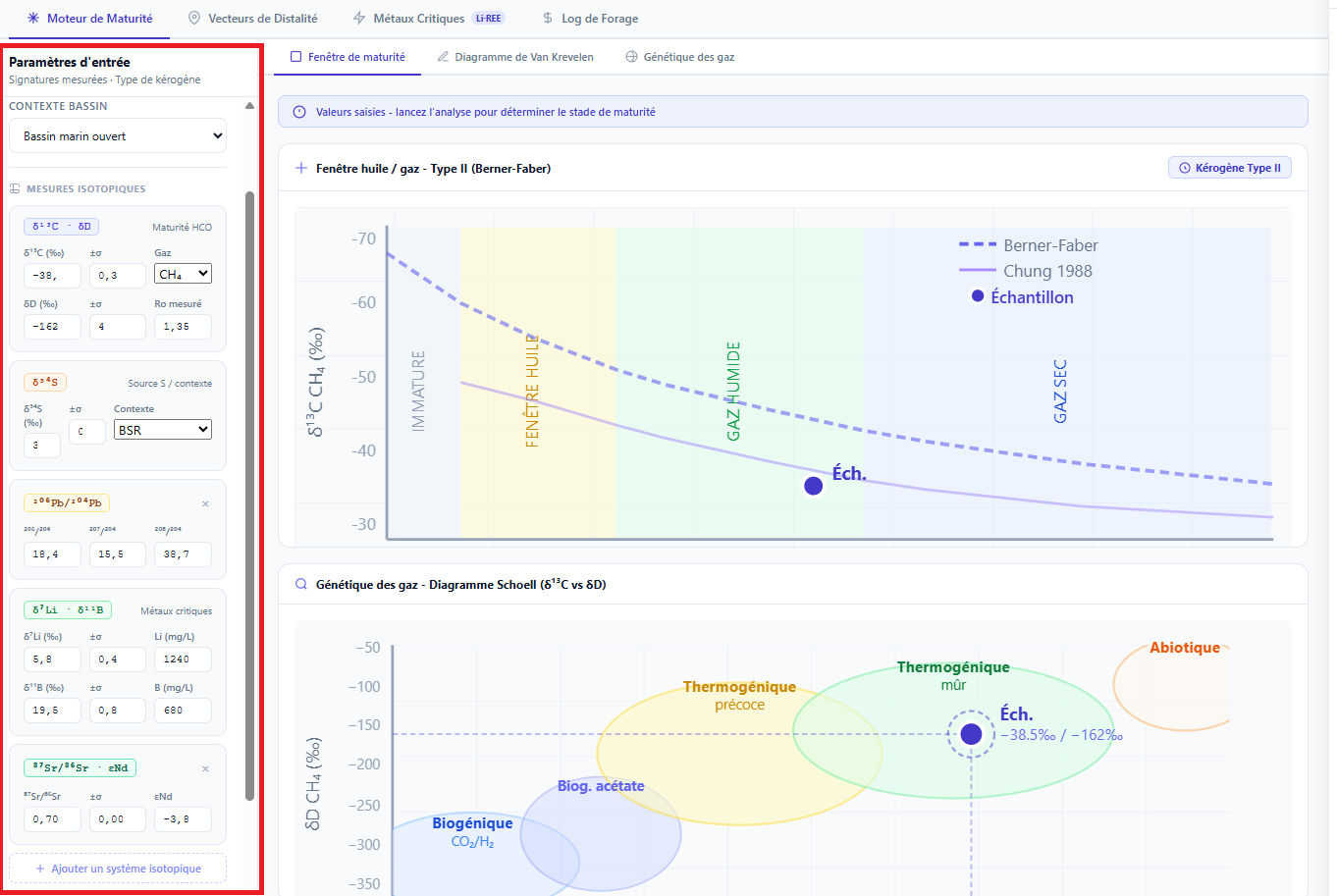 Figure 1: View of the configuration panel. Sections expand individually based on available systems.
Session Context Section
These fields are optional but useful for locating your analysis later.
| Field | Example | Usage |
|---|---|---|
| Name | Borehole F42-B - April 2025 | Label displayed in the session list. |
| Project | Andes Campaign 2025 | Groups sessions within a single project. |
| Sample Ref. | 1042 | ID of an existing sample in your IsoFind database (optional link). |
Organic Maturity Section
Feeds the Organic Maturity tab.
| Field | Unit | Notes |
|---|---|---|
| δ13C CH₄ | ‰ V-PDB | Typical values: −20 ‰ (dry gas) to −80 ‰ (biogenic). Primary maturity indicator. |
| δ13C Uncertainty | ‰ (1σ) | Used to plot error ellipses on charts. |
| δD CH₄ | ‰ V-SMOW | Typical values: −100 ‰ to −300 ‰. Complements δ13C on Schoell diagrams. |
| Measured Ro | % | If available, takes priority over δ13C inversion. |
| Kerogen Type | I / II / IIS / III / IV | Determines the maturity reference frame. Select II (marine) as default if unknown. |
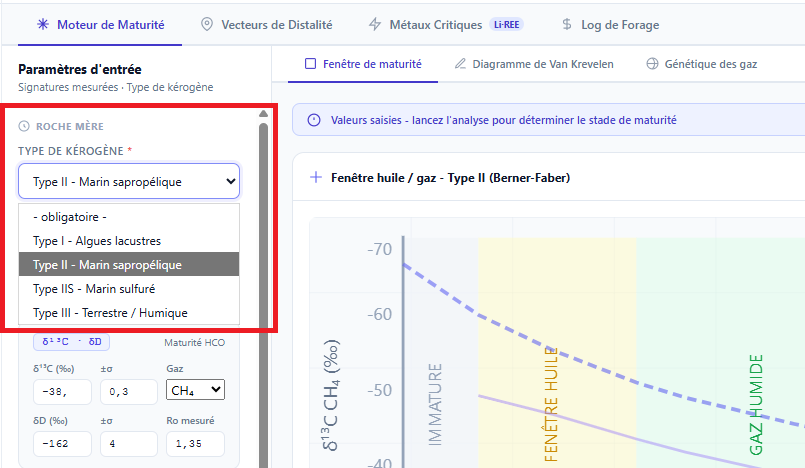 Figure 2: Organic Maturity section. The kerogen type conditions the reference frame displayed on the charts.
Distality Section (δ34S and Pb)
Feeds the Distality Vectors tab.
| Field | Unit | Notes |
|---|---|---|
| δ34S | ‰ V-CDT | Main distality tracer in sulfide hydrothermal systems. |
| Reference Region | - | Selection from 14 geological provinces. Automatically loads the central value and regional σ. |
| 206Pb/204Pb | - | Typical values: 17.5 to 20.5. First component for SK/ZD projection. |
| 207Pb/204Pb | - | Typical values: 15.4 to 16.0. |
| 208Pb/204Pb | - | Typical values: 36 to 41. |
If you haven't measured the local regional baseline, select the closest tectonic province from the list. Baselines are named by geological unit (e.g., French Massif Central, Bohemian Variscan Province) rather than by country.
Critical Metals Section (Li / B)
Feeds the Critical Metals tab.
| Field | Unit | Notes |
|---|---|---|
| δ7Li | ‰ L-SVEC | Typical brine values: −5 to +35 ‰. Highly positive values indicate clay fractionation. |
| [Li] Concentration | mg/L or ppm | Required to activate the salar potential score. Above 800 mg/L: high potential. |
| δ11B | ‰ NBS 951 | Tracer for fluid pH and deposition temperatures. Optional. |
Sr / Nd Section (Optional)
Contributes to the crustal component of the global score and improves source discrimination.
| Field | Unit | Notes |
|---|---|---|
| 87Sr/86Sr | - | Crustal sources: > 0.710. Mantle sources: ~0.703. |
| εNd | ε-units | Strongly negative values (< −10): ancient crustal component. |
Sigma Mode Parameter
This selector, located at the bottom of the panel, determines the confidence level used for deposit matches displayed in the results panel.
| Mode | Probability | When to Use It |
|---|---|---|
| 1σ | 68 % | Low-uncertainty data, confirming a specific lead. Fewer matches but highly reliable. |
| 2σ (Default) | 95 % | Standard exploration. Good balance between sensitivity and specificity. |
| 3σ | 99.7 % | High-uncertainty data or broad exploratory research. Many matches, requiring further refinement. |
Running the Analysis
Once the fields are filled, click the button at the bottom of the panel:
Configuration Panel
→
Update Analysis
The charts recalculate immediately on the client side. Deposit matches and the global score are sent to the server and returned in less than two seconds. The session is automatically saved after every successful analysis.