
Activate a Laboratory Certificate
An IsoFind Laboratory Certificate allows for the cryptographic signing of exported .isof files, certifying their authenticity and integrity. This Level 2 signature links analytical data to the identity of the signing laboratory, verifiable by any third party without an internet connection.
Why a Laboratory Certificate?
IsoFind exports analytical data in the ISOF format. An ISOF file can be signed at two levels:
| Level | Mechanism | Guarantees | Requirement |
|---|---|---|---|
| Level 1 | SHA-256 Content Hash | Integrity: The file has not been modified since export. | All licenses |
| Level 2 | ECDSA P-256 Signature with IsoFind PKI Certificate | Authenticity and Integrity: The file was signed by this specific laboratory, with a cryptographically verifiable identity. | All licenses (Certificate required) |
Level 2 signature is the required format for any use with legal or forensic value: expert reports, critical material traceability, and analytical chain of custody.
The IsoFind Trust Infrastructure (PKI)
IsoFind laboratory certificates are part of a three-level trust hierarchy managed by IsoFind SAS.
IsoFind Root CA
RSA 4096, valid for 20 years. Private key kept in an offline physical vault. Signs only the Issuing CA.
↓
IsoFind Issuing CA
ECDSA P-256, valid for 5 years. Signs laboratory certificates. Key stored on a dedicated HSM.
↓
Laboratory Certificate
ECDSA P-256, valid for 1 year. Unique to each laboratory. Used to sign ISOF files.
The Root CA and Issuing CA certificates are embedded within the IsoFind binary. Verification of a signed ISOF file traverses this chain locally, without connecting to a server. A Certificate Revocation List (CRL) is also embedded in each signed ISOF file to allow offline verification, with a fallback to pki.isofind.tech if the network is available.
How ISOF File Signing Works
Understanding the mechanism helps avoid confusion regarding what is transmitted between the laboratory and IsoFind SAS.
The laboratory's private key is generated locally by IsoFind and never leaves the machine. It is not transmitted to IsoFind SAS. Only the CSR (Certificate Signing Request) is transmitted: a file containing the laboratory's public key and identity information, but no secret data. IsoFind SAS signs this CSR with the Issuing CA and returns the .crt certificate.
When signing an ISOF file, IsoFind uses the local private key and the certificate to calculate an ECDSA signature on the content. This signature and the certificate are embedded in the ISOF file. The recipient verifies the lab certificate → Issuing CA → Root CA chain locally, then verifies the signature on the content. IsoFind SAS does not intervene at this stage.
Activation Procedure
1
Generate the Private Key and CSR in IsoFind
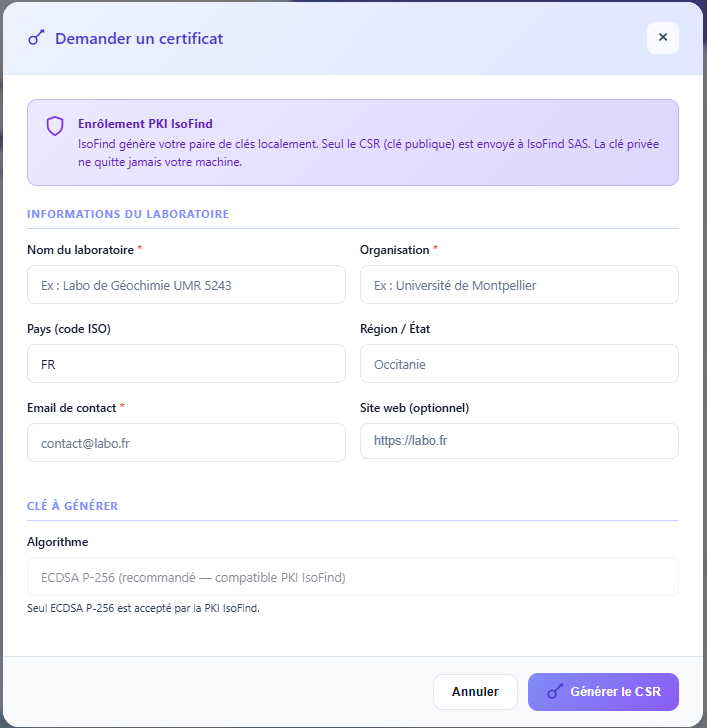 Figure 1: Laboratory information entry window for CSR generation.
In IsoFind, access the Certificates menu:
Certificates Menu
→
My Certificate
→
Request a Certificate
IsoFind locally generates an ECDSA P-256 key pair and produces a CSR file. The private key is stored encrypted in the local IsoFind cert store (%LOCALAPPDATA%\IsoFind\lab_cert\ directory, lab.key.enc file). It does not leave the machine.
Enter the laboratory name in the form as it should appear on the certificate (CN field), and optionally the country and organization.
Figure 1: Laboratory information entry window for CSR generation.
2
Transmit the CSR to IsoFind SAS
IsoFind displays the content of the CSR and offers to copy or export it. Send the CSR file to:
Specify the laboratory name, context of use (academic research, industry, forensics, defense), and optionally the active Pro license serial number to link the request to your subscription.
The CSR file only contains public information. There is no risk in transmitting it via unencrypted email. The corresponding private key remains on the machine and must never be shared.
3
Receipt of the Signed Certificate
IsoFind SAS verifies the laboratory's identity, the link to an active Pro subscription, and signs the CSR with the Issuing CA. The .crt file is sent by email. This certificate is valid for 1 year.
IsoFind SAS maintains the serial number of the issued certificate in its registry for renewal and potential revocation management.
4
Store the Certificate in IsoFind
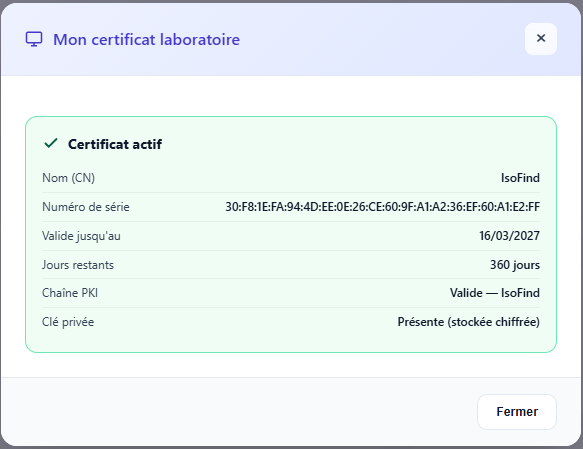 Figure 2: Status window showing an active and verified certificate.
In IsoFind, import the received .crt file:
Certificates Menu
→
My Certificate
→
Store Certificate
IsoFind verifies the trust chain of the imported certificate (embedded Root CA and Issuing CA), checks consistency with the locally stored private key, and stores the encrypted certificate in the cert store (lab.crt.enc). If the chain is valid and the key/certificate match is confirmed, the certificate status changes to Active.
Figure 2: Status window showing an active and verified certificate.
Using the Certificate to Sign an ISOF File
Once the certificate is installed and active, Level 2 signing is available when exporting data in ISOF format.
Certificates Menu
→
Sign an .isof file
Or directly during export:
Export Data
→
ISOF Format
→
Sign with Laboratory Certificate
IsoFind uses the locally stored private key and certificate (no additional password required if the cert store is unlocked). The resulting ISOF file contains the ECDSA signature, the laboratory certificate, the Issuing CA certificate, and a CRL snapshot to allow offline verification.
Scope of the Signature
The Level 2 signature covers all analytical blocks and identity metadata within the ISOF file. Specifically, the following fields are included in the signed payload:
| Signed Block | Content |
|---|---|
| created_by | Operator name, organization, software, and version used to produce the file. This field is protected to make it impossible to modify the creator's or laboratory's name without invalidating the signature. |
| isof_version | The ISOF format version used for export. |
| created_at | File creation timestamp. |
| project | Project reference associated with the export. |
| samples | Analytical data of the samples. |
| methods | Analytical methods and standards used. |
| purification | Purification yields associated with the samples. |
Any modification to one of these blocks after signing invalidates the ECDSA signature. Only fields outside this scope could be modified without detection, but no identity or analytical data fields are among them.
File Summary
| File | Role | Location | Retention |
|---|---|---|---|
| lab.key.enc | Encrypted ECDSA P-256 private key (AES-256-GCM, machine key) | %LOCALAPPDATA%\IsoFind\lab_cert\ | On this machine only. Never copy or export. |
| lab.crt.enc | Certificate signed by IsoFind Issuing CA, locally encrypted | %LOCALAPPDATA%\IsoFind\lab_cert\ | Automatically backed up in the IsoFind cert store. |
| lab_name.csr | Signing request (public key + identity). Transmitted to IsoFind SAS. | Exported during generation | Can be deleted after receipt of the certificate. |
| lab_name.crt | Public certificate received from IsoFind SAS before import into IsoFind | Received by email | Keep the email or file for renewal purposes. |
The private key stored in lab.key.enc is protected by a key derived from the machine's identifiers. It cannot be used on another station. In the event of losing this file (reinstallation, machine change), the private key is permanently lost. A new key pair must be generated and a new certificate requested.
Certificate Renewal
The certificate is valid for 1 year. IsoFind displays a warning when less than 30 days remain before expiration. Upon expiration, already signed ISOF files remain valid (the existing signature is verifiable as long as the certificate is not revoked). However, IsoFind can no longer produce new Level 2 signatures with the expired certificate.
To renew, the recommended approach is to generate a new key pair rather than reusing the old one. The procedure is identical to the first activation:
Certificates Menu
→
My Certificate
→
Renew Certificate
IsoFind generates a new CSR to be transmitted to colin.ferrari@isofind.tech, specifying the license serial number and that it is a renewal. Mention the old certificate's serial number if known.
It is advisable to initiate renewal at least two weeks before expiration, to account for processing time (1 to 2 business days) and the time needed to import the new certificate before the old one expires.
Emergency Revocation
If the machine is compromised or if the private key is suspected of being copied, contact IsoFind SAS immediately to request certificate revocation:
colin.ferrari@isofind.tech, Subject: Certificate Revocation [serial number]
IsoFind SAS revokes the certificate in the Certificate Revocation List (CRL) and publishes an updated CRL on pki.isofind.tech. New online verifications will immediately detect the revocation. Offline verifications relying on old CRL snapshots will only detect the revocation upon the next refresh, with a warning if the snapshot is older than 7 days.
Check Active Certificate Status
Certificates Menu
→
My Certificate
The window displays the Laboratory Common Name (CN), issue date, expiration date, serial number, trust chain status (verified/unverified), and revocation status if a recent CRL could be obtained.
Identity Verification of the Laboratory Head
Before issuing a certificate, IsoFind SAS verifies the identity of the laboratory head signing the request. This verification is the only step in the process where human intervention is irreplaceable: anyone can generate a CSR with any laboratory name. Proof of identity cryptographically links the issued certificate to a real person.
Recommended Option: Qualified Electronic Signature (eIDAS)
The recommended method is to sign the certificate request with a qualified electronic signature certificate as defined by the eIDAS regulation. This approach is the most legally robust and best suited for professional, industrial, and forensic contexts.
The laboratory head signs a PDF document containing the CSR and laboratory information with their qualified signature certificate, using one of the following solutions:
| Solution | Type | eIDAS Level |
|---|---|---|
| Certinomis | Professional certificate on physical token, issued by a French qualified CA | Qualified (Notarial value) |
| ChamberSign | Professional certificate via Chambers of Commerce, suitable for French companies | Qualified |
| DocuSign / YouSign | Online advanced electronic signature, identity verified at registration | Advanced (Probative, not qualified) |
| Public Institution Certificate | For institutional laboratories (universities, public bodies), a public agent certificate is sufficient | Advanced or Qualified depending on issuer |
The signed document is transmitted with the CSR to colin.ferrari@isofind.tech. IsoFind SAS receives a PDF with an unfalsifiable, timestamped audit trail. If the signature is of Qualified level under eIDAS, it has the same value as a handwritten signature before a notary in all EU member states.
For clients in defense, judicial forensics, or regulated traceability contexts, an eIDAS qualified signature is strongly recommended. It constitutes indisputable proof of identity in case of dispute and reinforces the trust chain of the issued certificate beyond IsoFind's technical scope.
Standard Option: Identity Document and Signed Contract
For academic laboratories or structures that do not yet have a qualified signature certificate, IsoFind SAS accepts as an alternative a copy of an official identity document from the signing laboratory head and a signed purchase order or subscription contract (handwritten or advanced signature). This option is valid but offers a lower level of traceability than an eIDAS qualified signature.
If your laboratory is attached to a French public institution (University, CNRS, CEA, INRAE, etc.), obtaining a public agent signature certificate from your IT department is generally free and fast. This is the simplest path to reach the Qualified level without external commercial steps.
Contact
For any certificate request, renewal, or emergency revocation:
Email: colin.ferrari@isofind.tech
Attach the CSR file generated by IsoFind, the identity verification document (electronically signed PDF or ID document depending on the chosen option), the active Pro license serial number, the laboratory name, and the context of use. The usual processing time is 1 to 2 business days.