Wednesday, 1 April, 2026

Normalising Data
Normalisation harmonises the text values in the database to guarantee the consistency of comparisons and analyses. It corrects spelling variants, inconsistent casing and non-standard abbreviations without modifying numerical values.
Why Normalise
When data is entered manually or imported from external sources, inconsistencies inevitably appear: the same material type may be entered as Water, water or eau depending on the operator or source file. An isotopic ratio may appear as 206Pb/204Pb or 206pb/204pb. These discrepancies do not affect the individual reading of a sample, but they distort groupings, filters and correspondence searches.
Normalisation resolves these inconsistencies by applying an internal lookup table that brings each value back to its canonical form as expected by IsoFind.
Accessing Normalisation
Normalisation functions are accessible from the Data menu:
Data
→
Database
→
Normalise materials
Full normalisation is also available via:
Data
→
Normalise all data
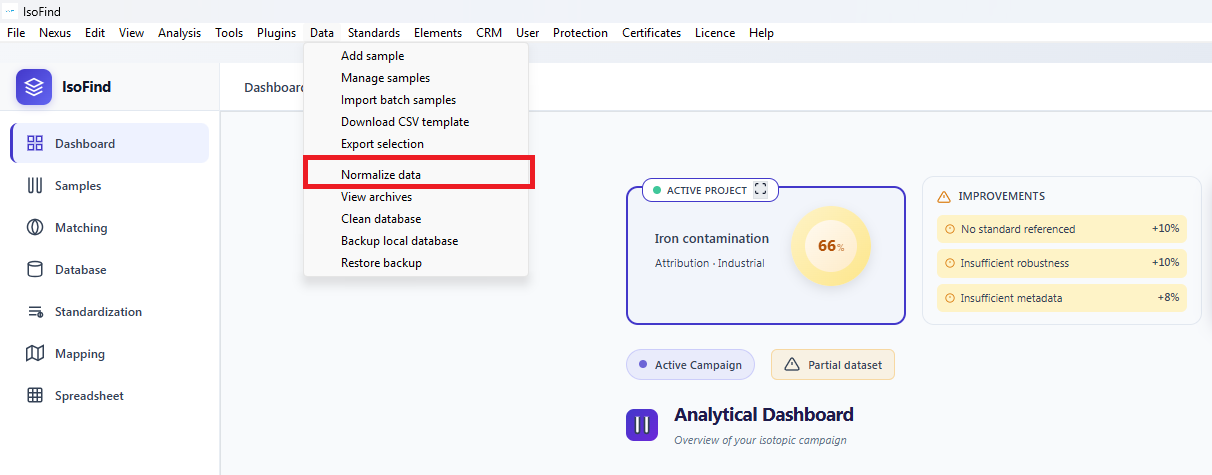 Figure 1: Normalisation buttons in the Database tab of the manager.
Material Type Normalisation
This operation targets only the Material type field of each sample. It corrects casing variants and non-canonical forms to bring them back to the values recognised by IsoFind's correspondence engine.
Examples of corrections applied: metal becomes Metal, WATER becomes Water, ore becomes Ore.
At the end of the operation, IsoFind displays the number of types corrected, and the details of the modifications are logged in the debug console (accessible via F12).
This operation is non-destructive on numerical values. Only text strings in the Type field are affected. It can be run as many times as needed without risk.
Full Normalisation
Full normalisation extends the operation to all text fields in the database. It simultaneously processes four categories of values.
| Category | Examples of corrections |
|---|---|
| Material types | metal, WATER, ore brought back to their canonical form with an initial capital letter. |
| Classifications | source, SOURCE, daughter normalised to Source, Daughter, Unclassified. |
| Isotopic ratios | 206pb/204pb normalised to 206Pb/204Pb, 87sr/86sr to 87Sr/86Sr. |
| Element symbols | pb, PB normalised to Pb. Same for Sr, Cu, Zn, etc. |
Confirmation is requested before execution. Once the operation is complete, IsoFind displays a summary indicating the total number of modifications per category. The complete detail of each change (value before, value after) is accessible in the debug console.
Full normalisation modifies the SQLite database directly. It is strongly recommended to create a backup from the Database tab before running this operation, particularly on a large or shared database.
Auto-Normalisation During Import
IsoFind can automatically normalise data at the time of import, without manual intervention. This behaviour is managed by the autoNormalize module, which activates if the module is available in the installation.
When auto-normalisation is active, it runs in the background immediately after each successful import. It processes the same categories as manual normalisation and logs its results to the console without interrupting the workflow.
If you regularly import data from instruments or CSV files produced by different operators, auto-normalisation guarantees immediate database consistency without having to run the manual operations after each import.
Verifying Results
After any normalisation operation, it is advisable to consult the main database view to ensure that the corrections have been applied correctly. Filters by material type and isotopic element allow quick verification that groupings are consistent.
For a detailed audit, the debug console (F12, Console tab) displays the complete table of modifications with the original and corrected values for each processed category.