Wednesday, 1 April, 2026

ML/Contextualisation
The Nexus integrates machine learning models with a precise and bounded role: providing statistical geochemical context to the calculation algorithms, not producing conclusions. This page explains what these models do, how they interact with IsoFind's proprietary algorithms, and how to use them in a workflow.
Two Distinct Levels: Contextualisation and Algorithms
Before using ML in the Nexus, it is important to understand the distinction between the two calculation layers that coexist in the system.
IsoFind's proprietary algorithms
IsoFind's algorithms are explicit physicochemical models. Every calculation rests on documented equations, traceable parameters and associated bibliographic references. For a Rayleigh fractionation process, the equation is exposed. For a mass bias correction, the coefficient is displayed. For an isochronic age calculation, the decay constants used are identifiable.
These algorithms are not a black box. Every step of the calculation is visible, every assumption is explicit, and results are reproducible independently of the software by any geochemist with the same parameters.
ML contextualisation models
ML models play a different and complementary role. They were trained on 1.7 million geochemical data points and serve to answer a specific question: in what statistical context does this geochemical system sit relative to the full range of documented situations?
In practice, they predict the probable speciation of an element under given conditions (distribution of oxidation states, dominant species in solution), and provide an associated confidence level. This information contextualises fractionation calculations by informing on the chemistry of the element in the medium, without replacing the physicochemical equations.
ML models make no scientific decisions. They produce no provenance interpretation, calculate no age and validate no workflow. Their output is exclusively a statistical context transmitted to the algorithms, which use it as one input parameter among others.
Technical Architecture of the Models
The Nexus ML system is built on two layers of ONNX-format models, deployed locally with the software.
| Model | Role | Inputs |
|---|---|---|
| speciation_layer1 | Prediction of the target element's speciation: distribution of oxidation states (reduced/oxidised) and dominant forms in solution (free/complexed). | Element, pH, pe, temperature, ionic strength, trace element concentrations. |
| adsorption_layer2 | Prediction of the adsorption/solution partition for trace elements on the mineral phases present. | Trace element concentrations, redox conditions, mineralogy of the adsorbing phase. |
The models are deployed locally with IsoFind. No data is sent to an external server during an ML analysis. The connection status of the models (available or not) is visible in the Nexus ML panel at startup.
Elements supported by the contextualisation models are geochemically active trace elements: Sb, Fe, Pb, Zn, Cr, Cd, Cu, Sn, Sr, Se. Additional elements will be deployed in future releases.
Using ML in a Workflow
The analysis card
ML analysis is triggered by adding an analysis card to the workflow and connecting it to an isotopic signature and a conditions card. The analysis card is the junction point between the geochemical workflow and the ML contextualisation engine.
Library
→
Analysis and tools
→
Analysis card
→
Drag to canvas
For ML analysis to be possible, the analysis card must be connected to at least one conditions card (pH, pe, temperature) and one isotopic signature card carrying the element to be analysed. Without a conditions card, the ML engine uses default values that may not be representative of the system under study.
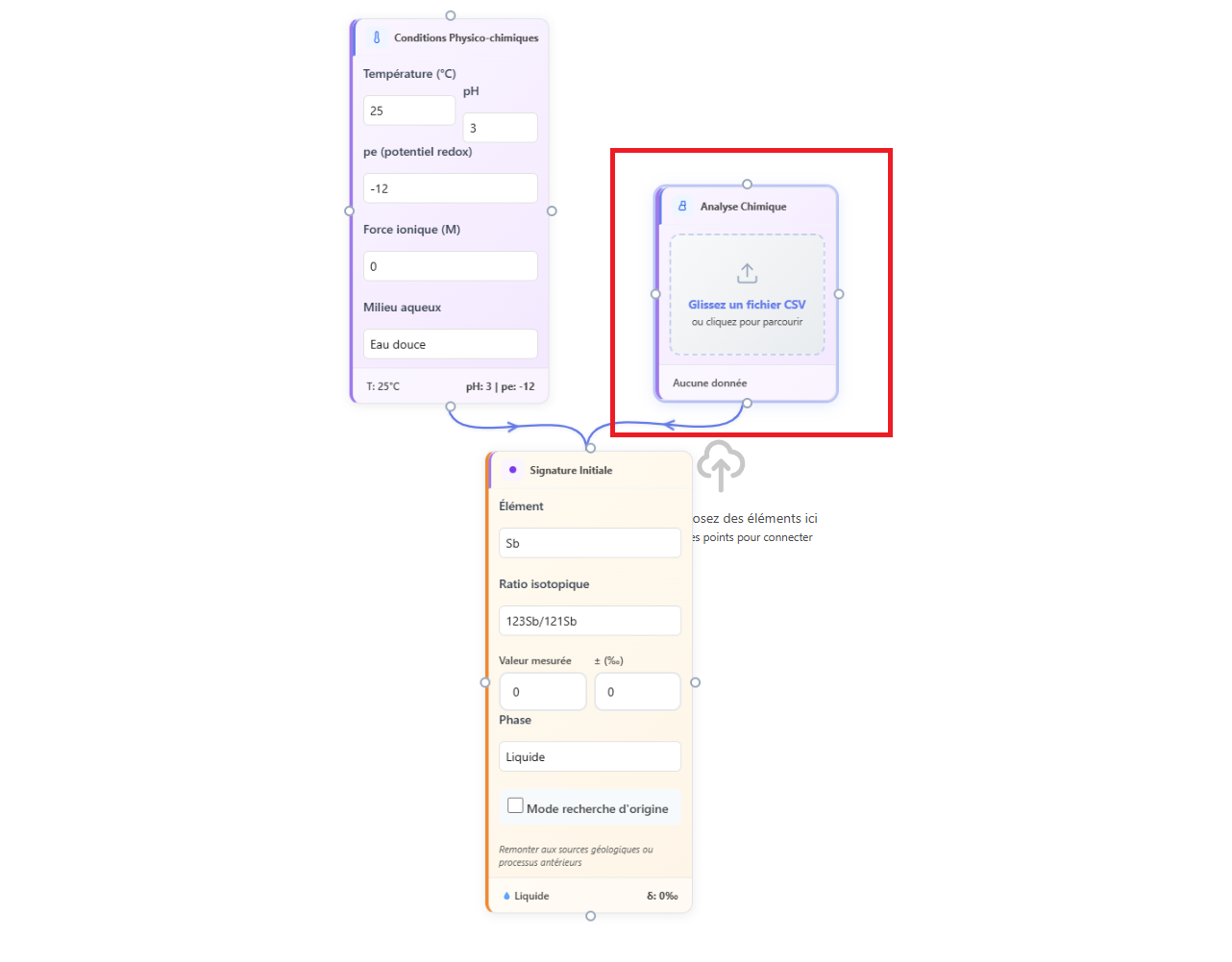 Figure 1: Analysis card connected to a signature and a conditions card in a workflow.
It is not necessary to connect the physicochemical conditions card directly to the chemical analysis card. Connecting both to the same card is sufficient and makes the diagram more readable.
Running the analysis
Once the workflow is structured with the analysis card correctly connected, the analysis is launched via the Execute button in the Nexus toolbar. The engine traverses the workflow in connection order, calculates fractionations via the physicochemical algorithms, then queries the ML models for the speciation context.
Results appear in the right side panel of the Nexus, in the ML Analyses section. Each analysis is listed with a colour-coded confidence badge indicating the statistical reliability of the speciation prediction.
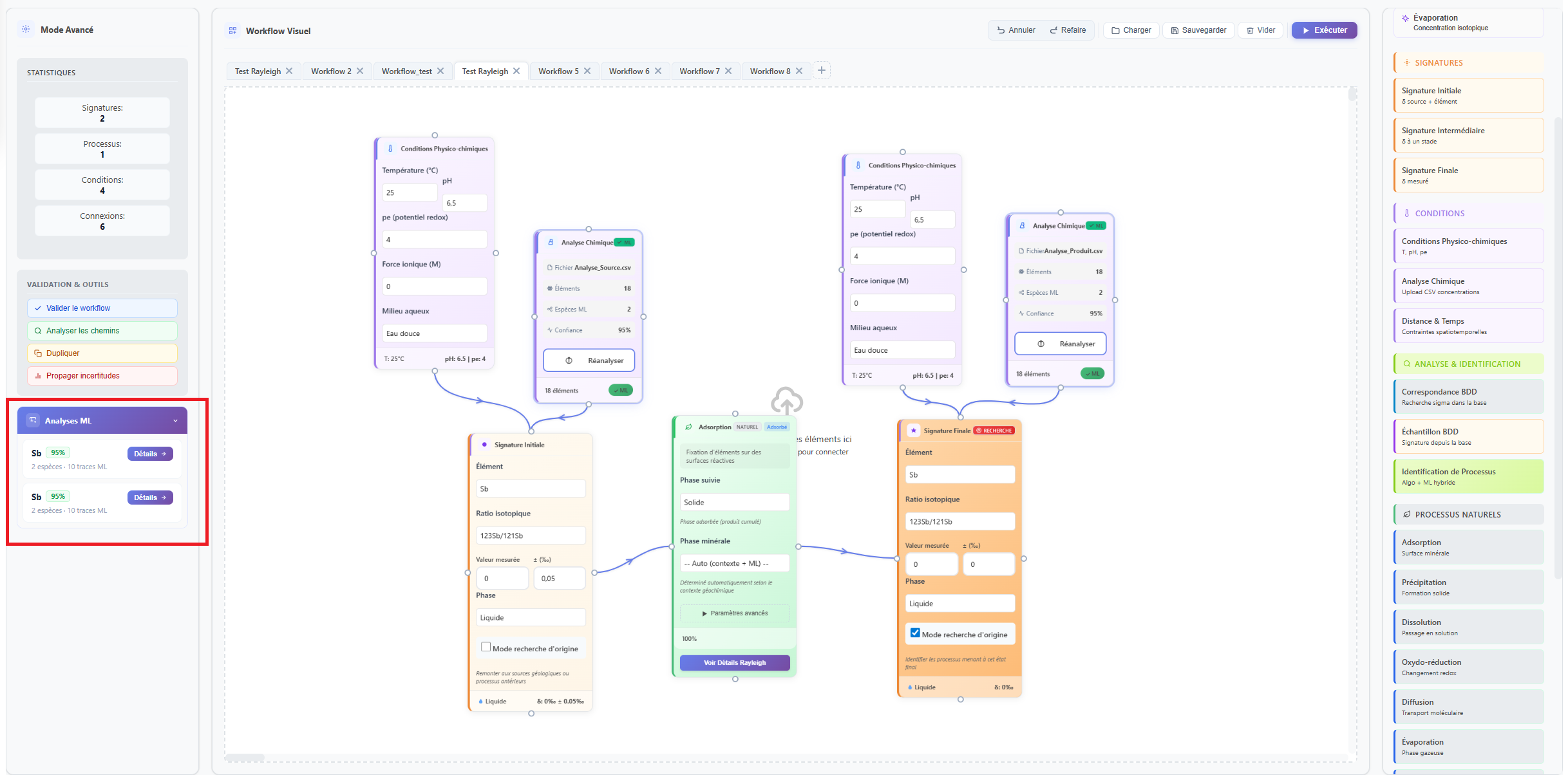 Figure 2: Results of the various ML analyses are displayed on the left side of the interface, listed in card activation order.
Reading Contextualisation Results
Clicking an entry in the ML panel opens the detail window. It presents results in three blocks.
Main element speciation
This block displays the distribution of predicted oxidation states for the analysed element. For a redox-active element such as Sb, Fe or Cr, the speciation bar shows the proportion of reduced form (blue) and oxidised form (orange). For an element whose primary speciation is complexation, the bar distinguishes the free form (grey) and the complexed form (purple).
The confidence level displayed at the top of the block indicates the extent to which the provided conditions correspond to situations well documented in the training data. A high confidence level (green, above 80%) indicates that the model encountered similar situations during training. A low level (red, below 60%) indicates that the conditions are atypical relative to the training dataset, and that predictions should be interpreted with caution.
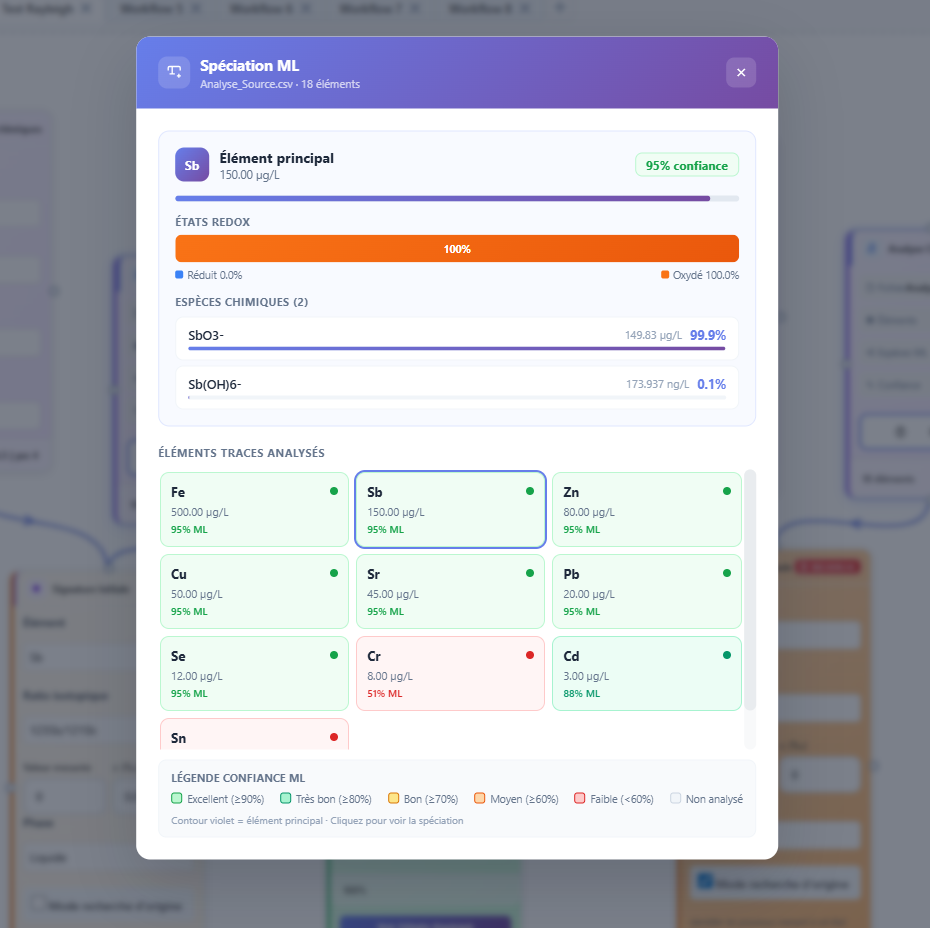 Figure 3: ML contextualisation results with the oxidation state distribution and confidence level.
Species in solution
The species list details the dominant chemical forms predicted in solution, ranked by decreasing proportion. Each species is accompanied by a mini progress bar indicating its relative contribution to the total speciation. This information comes directly from the output of the speciation_layer1 model.
Trace element grid
The grid displays all trace elements analysed in parallel with the main element. Each element is represented by a dot coloured according to its ML confidence level. The main workflow element is highlighted by a distinct outline. This view allows quick identification of which trace elements are in well-documented conditions and which fall outside the models' validity domain.
The trace element grid is particularly useful for identifying significant geochemical co-variations. If multiple elements simultaneously show high confidence levels under similar redox conditions, this may indicate a common controlling process (adsorption on the same iron oxide, for example) consistent with the workflow's assumptions.
Interpreting Confidence Levels
| Level | Threshold | Meaning |
|---|---|---|
| High | Above 80% | Conditions are well represented in the training data. The speciation prediction is statistically robust and can be used with confidence to parameterise the algorithms. |
| Moderate | 60% to 80% | Conditions are partially documented. The prediction is plausible but should be checked against field data and the bibliography specific to the system under study. |
| Low | Below 60% | Conditions are atypical or poorly documented in the training data. The prediction is uncertain. It is advisable to rely on values from the process library rather than ML contextualisation. |
A low confidence level does not invalidate the analysis. It simply signals that the ML model is operating outside its statistical validity domain. In this case, the fractionation algorithms continue to function with the parameters entered manually in the cards, without using ML predictions as input.
Operation Without ML Models
If the ONNX model files are not present in the installation (Research version without the ML module, or installation without the models), the Nexus automatically switches to simulation mode. In this mode, the ML panel signals the absence of models, and the fractionation algorithms operate solely with the explicit parameters from the workflow cards, without statistical contextualisation.
The model status can be consulted at any time in the Nexus ML panel. The mention mode: onnx indicates that the models are loaded and active. The mention mode: simulation indicates that the fallback is active.
Simulation mode produces scientifically valid results for all fractionation calculations. ML contextualisation enriches these results but does not condition them. A workflow built and executed without ML remains fully usable and reproducible.