Thursday, 2 April, 2026

Verifying ISOF File Integrity
Three ways to verify that an .isof file has not been modified since its creation: via IsoFind, using the online widget, or through Python.
This page covers the three methods for verifying an .isof file: from the IsoFind interface, via the online widget at isofind.tech, and using Python with the isof package. To understand what the verification proves, see Digital Signatures.
Within IsoFind
IsoFind automatically verifies the signature of any .isof file that is opened or imported. The result is displayed in the file's metadata panel.
File
→
Open .isof File
→
Metadata Panel
→
Integrity
| Indicator | Meaning |
|---|---|
| Valid: Level 1 | Matching SHA-256 fingerprint. Data has not been modified since export. |
| Valid: Level 2 | Valid ECDSA signature, intact PKI chain. Laboratory authenticity confirmed. |
| Invalid Signature | Fingerprint or signature mismatch. File potentially modified after export. |
| Certificate Revoked | The signing laboratory's certificate is listed on the revocation list. |
| Unsigned | File exported without signature options. Integrity is not guaranteed. |
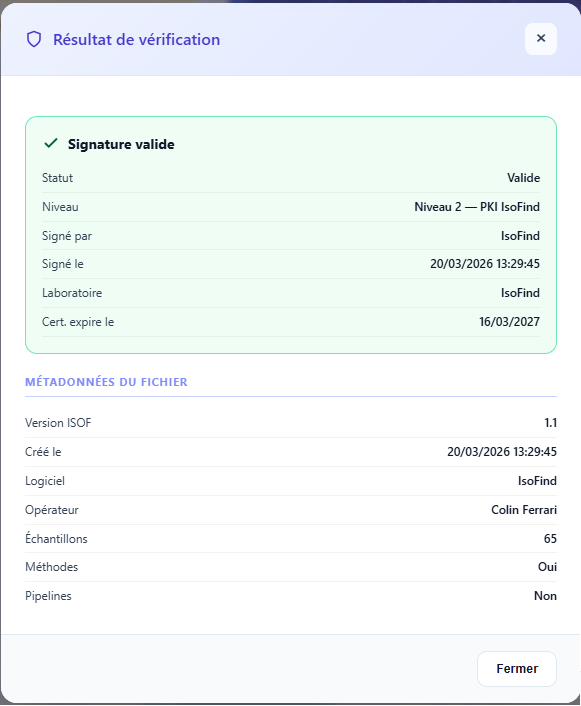 Figure 1: Verification panel showing a valid Level 2 result, signing laboratory information, and timestamp.
Online Verification Widget (Coming Soon)
To verify a file without having IsoFind installed, or to share proof with a third party, IsoFind provides a client-side widget on isofind.tech. The file is analyzed entirely within the browser; no data is transmitted to a server.
isofind.tech/verify
→
Drop .isof File
→
Immediate Result
The widget displays the detected signature level, the signing laboratory (if Level 2), the timestamp, and a data summary (number of samples, elements covered). A downloadable JSON report is produced for archiving purposes.
The widget works without an internet connection: the Root CA and Issuing CA certificates are embedded in the widget's JavaScript. Only online revocation checking is optional.
Using Python
The isof package (PyPI) enables verification within automated scripts or pipelines. See the Python Integration page for installation and API authentication details.
import isof
report = isof.load("bolivia_analysis.isof")
# Quick check
if report.is_authentic():
print("Integrity confirmed")
# Detailed result
result = report.verify()
print(result.valid) # True / False
print(result.level) # 1 or 2
print(result.signer) # "IGE Grenoble: ..."
print(result.signed_at) # "2025-03-10T14:32:00Z"
print(result.reason) # None if valid, error message otherwise
Via the Local IsoFind API
The internal API exposes a verification endpoint that can be used by any local script while IsoFind is running.
# POST /api/isof/verify: multipart body with the file
import requests
with open("analysis.isof", "rb") as f:
r = requests.post(
"http://127.0.0.1:8001/api/isof/verify",
files={"file": f},
headers=HEADERS
)
result = r.json()
print(result["valid"], result["level"], result["signed_by"])