Wednesday, 1 April, 2026

Creating and Signing an .isof File
Three approaches to producing a valid .isof file: exporting from the IsoFind interface, via the local API, or through programmatic construction using Python or a third-party LIMS.
An .isof file can be created from the IsoFind interface, via the local API, or programmatically using Python. This page covers all three methods and the available signing options. To understand the signature mechanism, see Digital Signatures.
From the IsoFind Interface
Exporting a Project or Selection
File
→
Export Project (.isof)
IsoFind opens an export options window with the following settings:
| Option | Description |
|---|---|
| Scope | Entire project, a selection of samples, or filtered by element. |
| Include methods | Embeds analytical protocols within the file. |
| Include purification yields | Embeds the purification block. |
| Sign (Level 1) | Adds a SHA-256 fingerprint. Available with all licenses. |
| Sign (Level 2) | Adds an ECDSA signature. Requires an active laboratory certificate and a Pro license. |
| Operator | Name displayed in created_by.operator. |
| Organization | Name displayed in created_by.organisation and in the signature. |
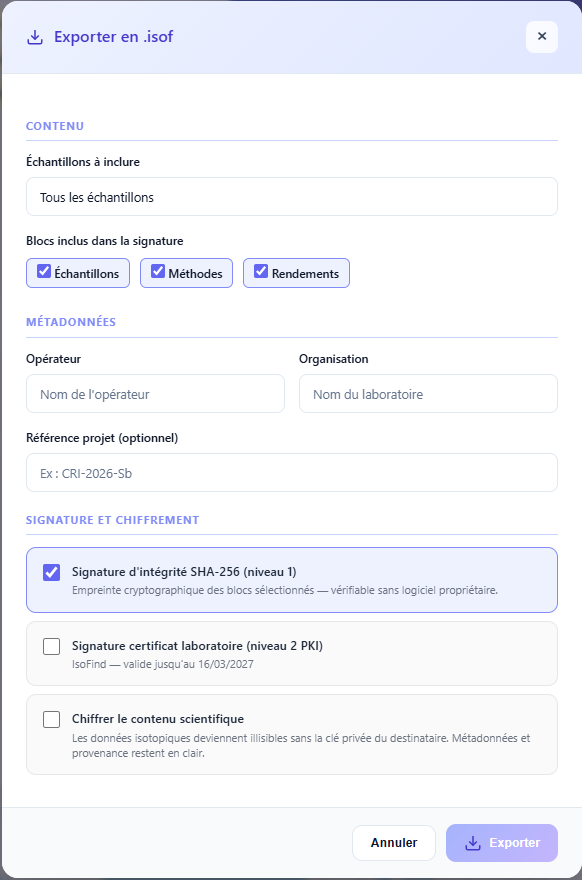 Figure 1: Export window showing Level 1 and Level 2 signature options.
Signing an Existing File
An .isof file that has already been produced can be signed later without re-exporting the data.
File
→
Sign an .isof File
→
Choose File
→
Select Level
Signing a file that already contains a signature of the same level will replace it. Signing a Level 1 file with a Level 2 signature preserves the Level 1 signature and adds the Level 2 signature.
Via the Local API
Exporting and Signing in a Single Request
import requests, json
# Build the export payload
payload = {
"sample_ids": [1, 2, 3], # None = entire project
"include_methods": True,
"include_purification": True,
"sign": True,
"sign_level": 1, # 1 = SHA-256, 2 = ECDSA
"operator": "Colin Ferrari",
"organisation": "IsoFind SAS"
}
r = requests.post(
"http://127.0.0.1:8001/api/isof/export",
json=payload,
headers=HEADERS
)
# Save the returned file
with open("export.isof", "w", encoding="utf-8") as f:
json.dump(r.json(), f, indent=2, ensure_ascii=False)
Signing an Existing File via API
# POST /api/isof/sign: multipart: file + private key + certificate
with open("export.isof") as fi, \
open("lab.key") as fk, \
open("lab.crt") as fc:
r = requests.post(
"http://127.0.0.1:8001/api/isof/sign",
files={
"isof_file": ("export.isof", fi),
"private_key": ("lab.key", fk),
"certificate": ("lab.crt", fc),
},
headers=HEADERS
)
signed = r.json()
print(signed["signature"]["signed_by"])
Via Python (Manual Construction)
To build an .isof file from scratch—for example, to export data from a LIMS or other software—here is the minimum valid structure.
import json, hashlib
from datetime import datetime, timezone
doc = {
"isof_version": "1.0",
"created_at": datetime.now(timezone.utc).isoformat(),
"created_by": {
"software": "MyLIMS",
"software_version": "3.2",
"operator": "Sophie Martin",
"organisation": "CNRS: CRPG Nancy"
},
"samples": [
{
"id": "S01",
"name": "ANT-BO-24-003",
"material_type": "flotation concentrate",
"sector": "Bolivia",
"isotope_data": [
{
"element": "Sb",
"system": "123Sb/121Sb",
"ratio": 0.74815,
"ratio_2se": 0.00012,
"standard": "NIST SRM 3102a"
}
]
}
]
}
# Add a Level 1 signature
scope = ["created_by", "isof_version", "created_at", "samples"]
payload = {k: doc[k] for k in scope}
digest = hashlib.sha256(
json.dumps(payload, sort_keys=True, separators=(",", ":"), ensure_ascii=False).encode()
).hexdigest()
doc["signature"] = {
"level": 1,
"algorithm": "SHA-256",
"scope": scope,
"hash": digest,
"signed_at": datetime.now(timezone.utc).isoformat(),
"signed_by": "CNRS: CRPG Nancy"
}
with open("export.isof", "w", encoding="utf-8") as f:
json.dump(doc, f, indent=2, ensure_ascii=False)
The signature scope should include all blocks containing analytical data. Omitting created_by or created_at from the scope allows metadata to be modified without invalidating the signature, which weakens the authenticity guarantee. IsoFind consistently includes these 7 blocks in the default scope.
File Naming
The recommended convention by the ISOF specification is as follows:
{project}_{date}_{laboratory}.isof
# Example
SDAT-2025-007_20250310_IsoFind.isof
This naming convention allows for natural chronological sorting and identifies the file's origin without opening it.