Wednesday, 1 April, 2026

Adding and Editing Processes
This page describes how to populate a Nexus workflow: adding cards from the library, configuring each process, connecting cards to each other, and understanding where the fractionation coefficients used in calculations come from.
The Process Database
The processes available in the Nexus are not hard-coded into the interface. They are stored in a dedicated database, separate from IsoFind's main database which contains samples and analytical isotopic data.
This separation is intentional. The process database contains geochemical definitions: transformation types, default fractionation parameters, associated bibliographic references, and coefficients from the scientific literature. It is maintained independently of field data, allowing it to be updated without risk of altering analytical measurements.
In practice, IsoFind uses several specialised SQLite databases: isofind.db for analytical data, workflows.db for saved workflows and Nexus processes, and other dedicated databases for CRMs and community data. This multi-database architecture ensures that each functional domain remains isolated and that maintenance operations on one do not affect the others.
The fractionation coefficients in Nexus cards originate from scientific bibliographic references integrated into the process database. Every default parameter is traceable back to its source. The Fractionation Databases page details this reference management.
The Process Library
The process library occupies the right panel of the Nexus. It lists all available card types, organised by category. Each item can be dragged and dropped onto the canvas to add it to the workflow.
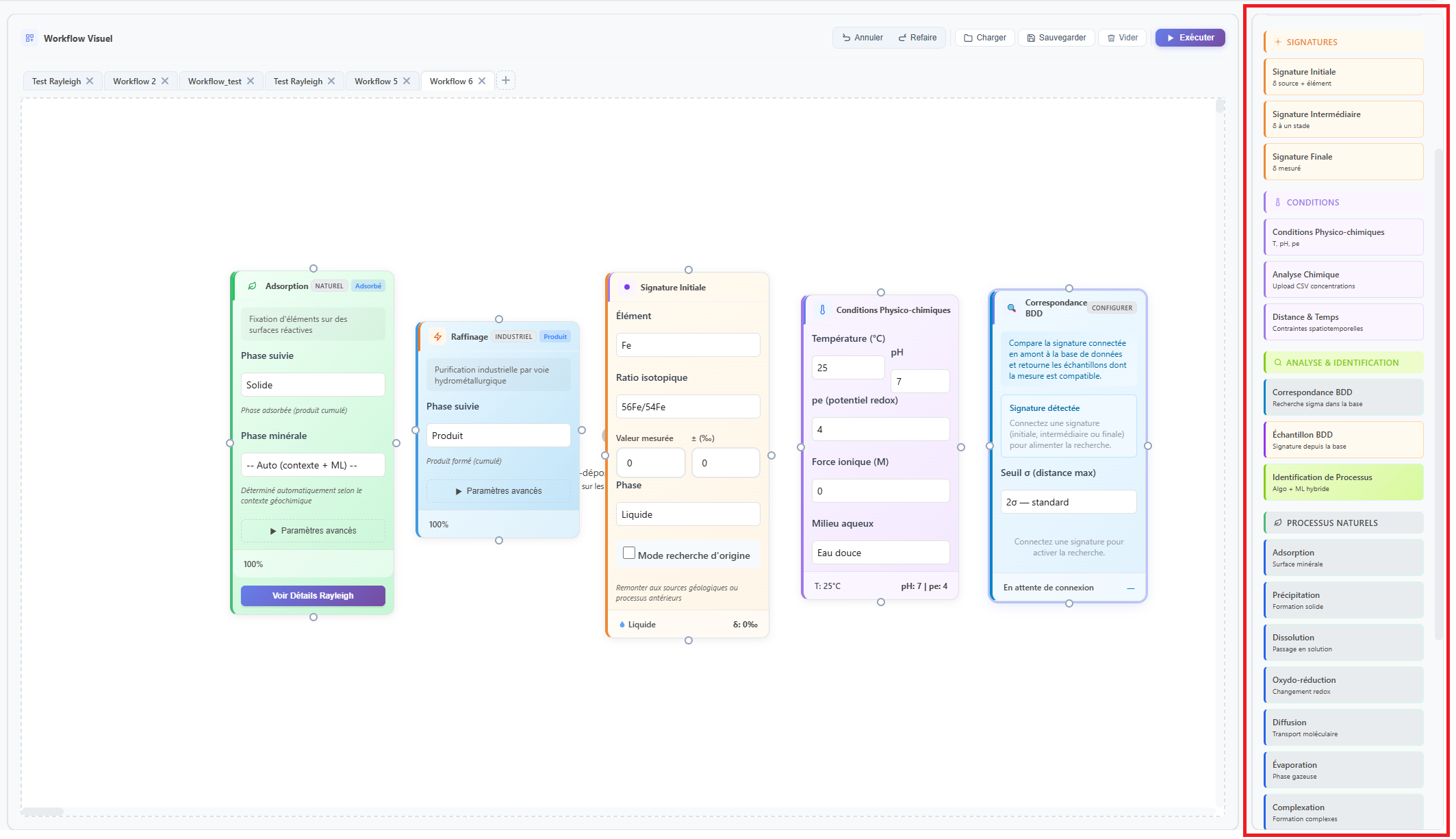 Figure 1: Library panel with the available process categories.
Cards are grouped into five visually distinct categories by colour code:
| Category | Colour | Available types |
|---|---|---|
| Natural processes | Pastel green | Weathering, oxidation, reduction, precipitation, dissolution, adsorption, desorption, complexation, evaporation, diffusion, redox. |
| Industrial processes | Pastel blue | Smelting, refining, leaching, electrolysis, centrifugation, distillation. |
| Isotopic signatures | Pastel orange | Initial signature (source), final signature (target). |
| Chemical conditions | Pastel purple | Conditions card (pH, pe, temperature, ionic strength, medium). |
| Analysis and tools | Light blue | Analysis card, provenance search card, temporal constraint. |
Adding a Card to the Workflow
By drag and drop
Click on an item in the library and drag it to the desired position on the canvas. Releasing the button creates the card at the drop location with its default parameters.
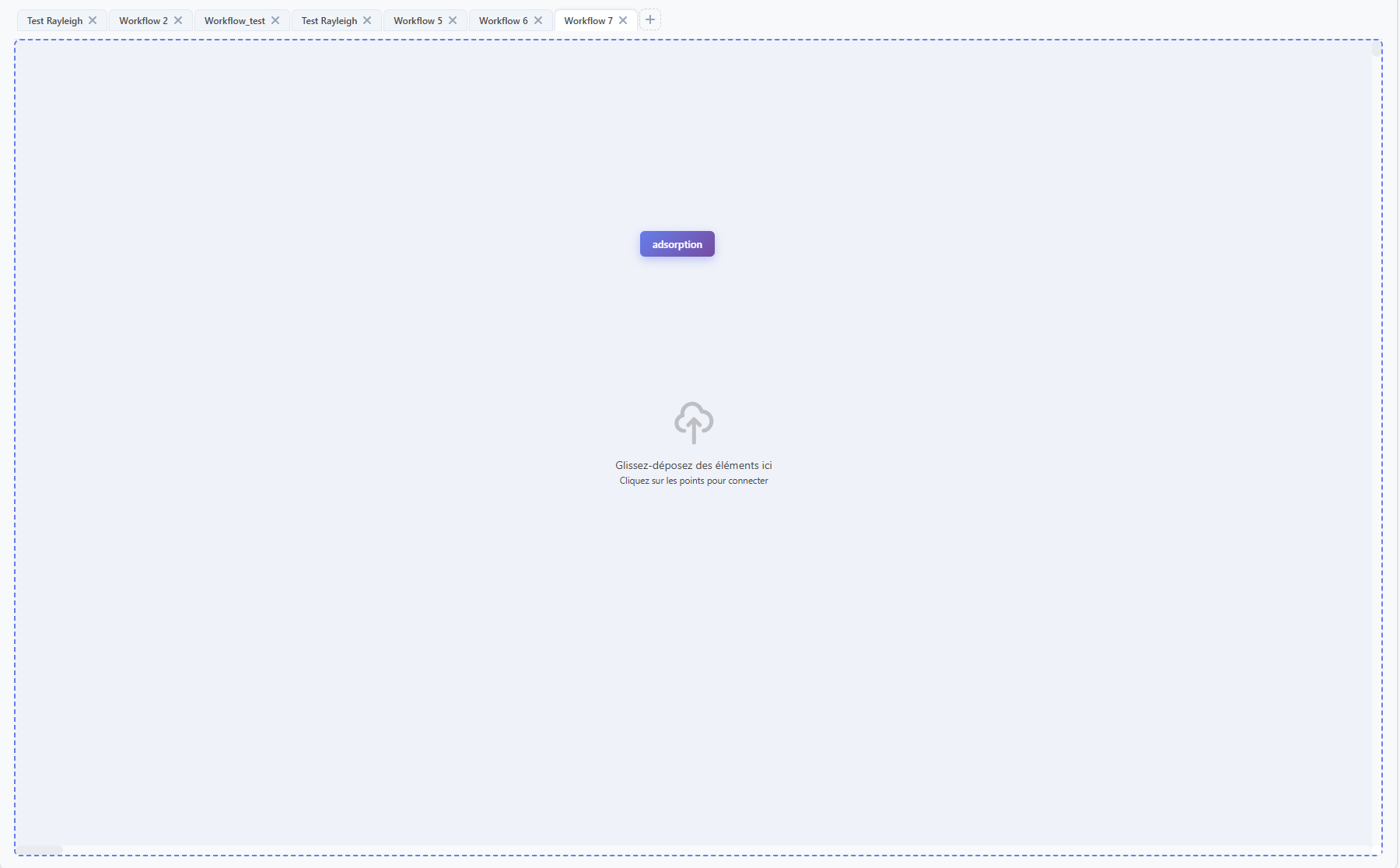 Figure 2: Adding a process card by drag and drop from the library. The zone should be outlined in blue dashes.
Once placed, the card can be freely repositioned on the canvas by drag and drop. The canvas is a near-infinite surface with no size limit for complex workflows.
Configuring a Card
Each card type exposes fields specific to its process. Default values are pre-filled from the process database. They can be modified directly on the card without leaving the canvas.
Parameters of an isotopic signature card
| Parameter | Description |
|---|---|
| Element | Symbol of the isotopic element (Pb, Sr, Cu, Sb...). The list is fed by IsoFind's Element Manager. |
| Isotopic ratio | The specific ratio to model (e.g. 206Pb/204Pb). Available options update automatically based on the selected element. |
| δ value | Delta value of the isotopic signature in per mil notation. |
| Uncertainty | Associated analytical uncertainty (2σ). Used for error propagation in calculations. |
| Phase | Physical phase of the sample: solid, liquid or gas. |
Parameters of a geochemical process card
Parameters vary by process type. For a Rayleigh-type process (evaporation, crystallisation), the exposed fields are the fractionation factor α or ε, and the reacted fraction f. For an adsorption process, parameters include partition coefficients and the mineral phases involved. For industrial smelting or refining, temperature and operating conditions are accessible.
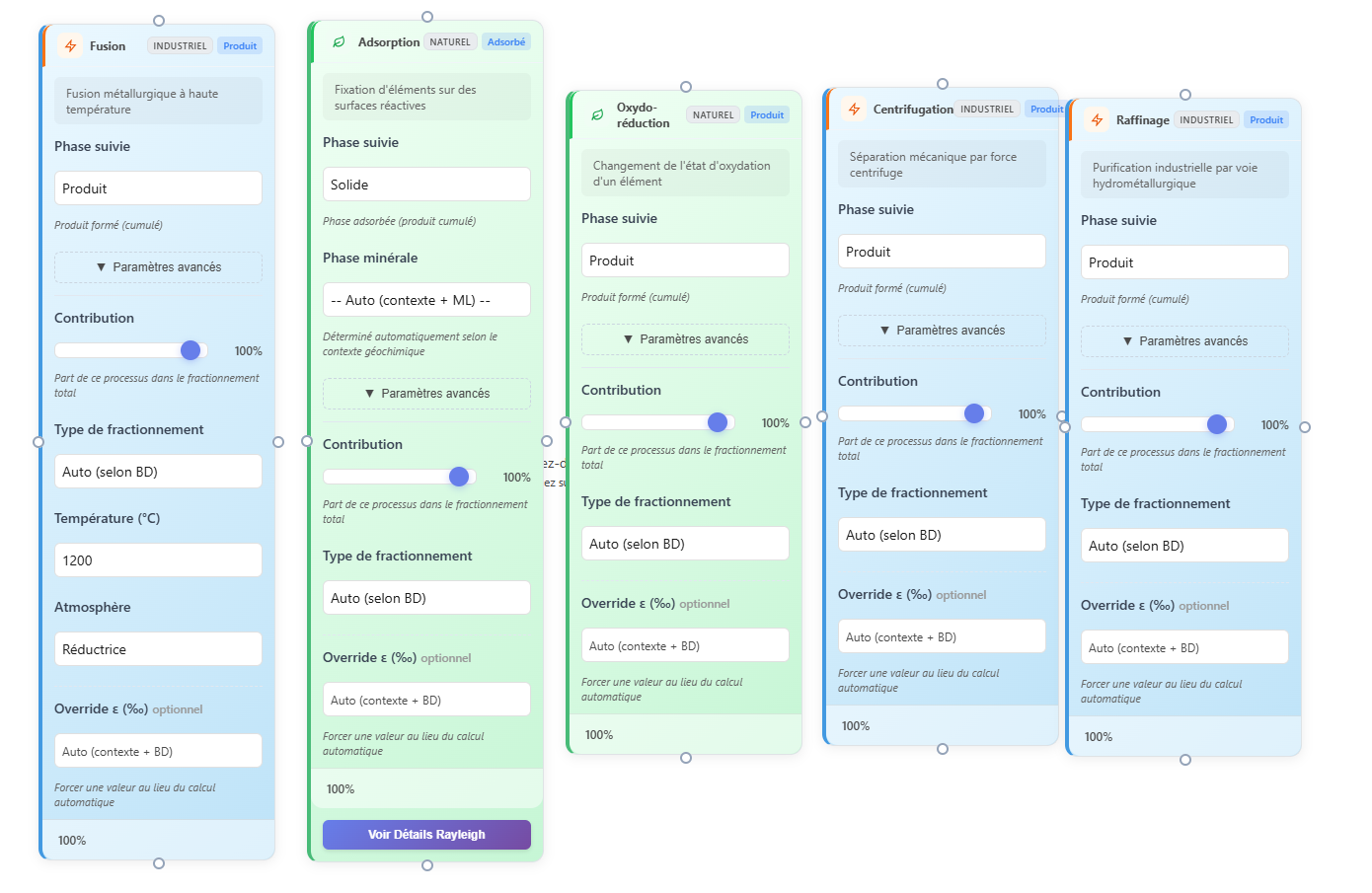 Figure 3: Parameters of an adsorption process card on ferrihydrite.
All cards have a "tracked phase" field, which notifies the algorithms which phase (reactant/product; solid, liquid or gaseous phase if applicable) to follow and on which to calculate the isotopic fractionations.
Parameters of a chemical conditions card
The conditions card defines the physicochemical context in which the connected processes run. It exposes the pH, pe (redox potential in pe units), temperature in degrees Celsius, ionic strength and medium type fields. These values are passed to the speciation engine and the associated fractionation calculations.
Provenance search card
The provenance search card is a particular type of analysis card. When connected to an isotopic signature in the workflow, it triggers an automatic correspondence search in the IsoFind database. Several options allow the search to be refined: restricting to sources only, to daughters only, filtering by material type, by classification, or querying only the active project data.
Connecting a conditions card to a process before triggering the analysis allows the engine to adjust the fractionation coefficients based on the actual redox context of your system, rather than using the generic literature values stored by default.
Connecting Cards
Cards connect via directional arrows. Each card has connection points on its four sides (top, bottom, left, right). To create a connection:
Hover over the edge of a card until a connection point appears in blue. Click and hold the mouse button, then drag towards the connection point of a second card. Release to create the arrow.
Connections are represented by blue Bézier curves on the SVG canvas. They can be deleted by clicking on the arrow. A workflow can contain parallel paths: the same node can be connected to multiple processes simultaneously to model multi-branch scenarios.
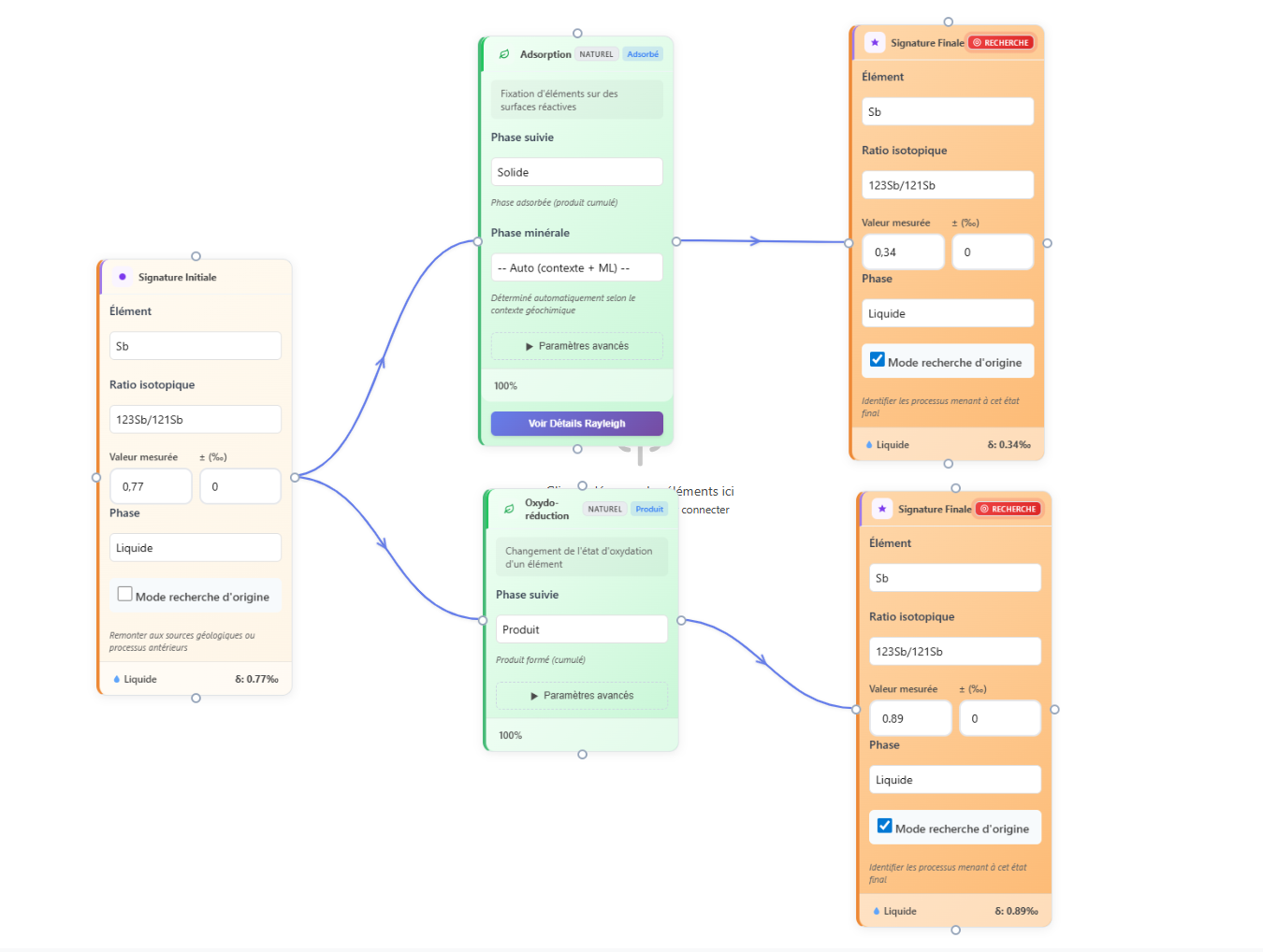 Figure 4: Connections between cards with a parallel path modelling two distinct phases (an adsorption tracking the solid phase and an oxidation tracking the remaining product).
The order of connections is significant. The calculation engine traverses the workflow in the direction of the arrows to propagate isotopic values from one card to the next. A connection in the wrong direction does not generate a visible error but produces inconsistent results. Always verify that arrows point from source to target.
Moving and Deleting Cards
A card can be freely repositioned on the canvas by drag and drop. Connections attached to the card reposition automatically during the move.
To delete a card, select it by clicking on it (it highlights in blue) then press the Delete key. Connections attached to the card are deleted at the same time.
To delete a connection without deleting the cards, click directly on the arrow to select it, then press Delete.
Workflow Validation
Before running a calculation, the Nexus verifies the structural consistency of the workflow. This validation checks for the presence of at least one initial signature, at least one geochemical process, and an analysis card. It also flags isolated cards, i.e. those with no incoming or outgoing connections.
Validation messages are displayed in the Nexus tools panel. An invalid workflow cannot be submitted to the calculation engine.
Starting from one of the four preconfigured templates (Acid Mine Drainage, Industrial Refining, Natural Weathering, Evaporation) provides an already-validated workflow structure with coherent geochemical parameters. This is the recommended starting point before building a custom workflow from scratch.
The Process Library Page
The Process Library is a dedicated page, accessible from the Nexus side navigation bar via the gear icon. It constitutes the central repository of fractionation data underpinning Nexus calculations.
Nexus
→
Side bar
→
Process Library
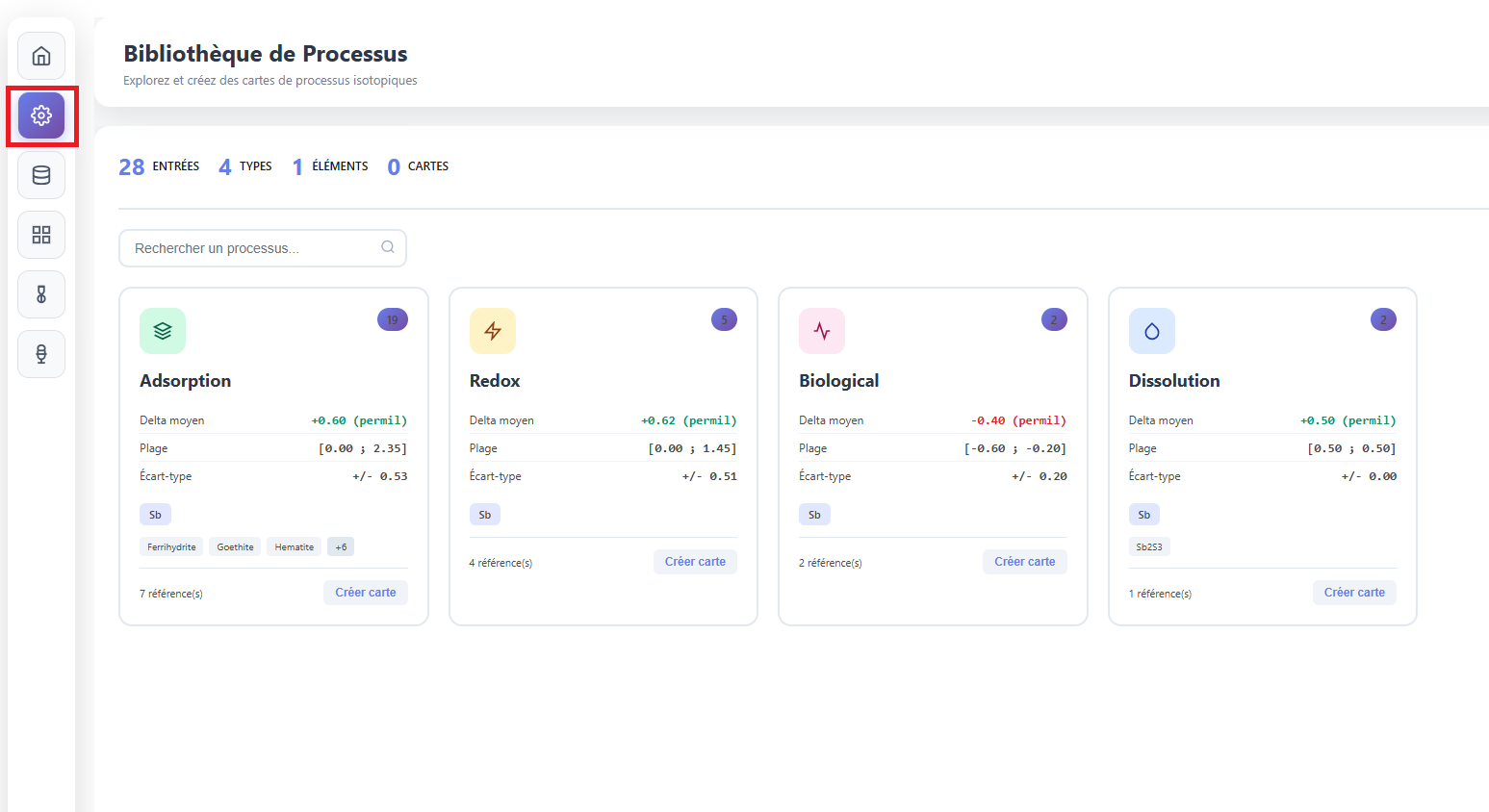 Figure 5: Overview of the Process Library with type cards and their fractionation statistics.
Reading the library
The page opens on a grid of cards, one per process type present in the database. The statistics bar at the top displays the total number of entries, the number of distinct types, the number of elements covered, and the number of custom cards created by the user.
Each card summarises the data available for a given process type. It displays the mean fractionation delta (in per mil, with positive/negative colour coding), the range of values observed in the literature, the standard deviation, the elements concerned and the documented materials or minerals. The counter in the top right indicates the number of underlying bibliographic entries.
Clicking on a card opens the full detail: all individual entries from the literature, each with their experimental conditions (pH, temperature, phases), their oxidation states and their complete bibliographic reference.
Editing an existing entry
In the detailed view of a process type, each individual entry is editable. Clicking the edit button on a row opens the modification form, which exposes all fields of the entry.
| Field | Description |
|---|---|
| Element | Symbol of the isotopic element concerned by this entry. |
| Process type | Geochemical category: adsorption, redox, dissolution, precipitation, biological, evaporation, diffusion, complexation. |
| Material / Detail | Mineral phase or contextual detail (e.g. Ferrihydrite, Goethite). |
| Delta (per mil) | Value of the isotopic fractionation measured or calculated in the bibliographic source. |
| Uncertainty (per mil) | Analytical uncertainty associated with the delta value, if available. |
| Temperature, pH | Experimental conditions under which the fractionation was measured. |
| Phase A / Phase B | Source and product phases of the isotopic transfer (e.g. aqueous Sb(V) / adsorbed Sb(V)). |
| Initial / final oxidation state | Redox speciation of the element before and after the process. |
| Reference, Year, DOI | Complete bibliographic source. Each entry is traceable back to its original publication. |
| Notes | Free field for any additional context not covered by the structured fields. |
Creating a custom card
The Create card button at the bottom of each type card, or the New card button at the top of the page, opens the creation form. A custom card aggregates the fractionation parameters that the user wishes to use by default for a given process in their workflows.
The required fields are the card name, element, process type and delta value. Experimental conditions (min/max pH, min/max temperature) are optional. Once saved, the card appears in the My cards panel to the right of the library, and becomes available in the Nexus canvas library.
Creating a custom card from published values for your study system (element, minerals, field conditions) allows fractionation parameters in your workflows to be pre-filled with directly relevant values, without having to re-enter them for each new analysis.
Deleting an entry from the library is an irreversible operation. Deleted data cannot be recovered. For entries from scientific literature integrated by IsoFind, it is advisable to edit rather than delete, in order to preserve the bibliographic traceability of the coefficient used in calculations.