Wednesday, 1 April, 2026

Introduction
Welcome to the official IsoFind documentation. This software is designed to centralise and exploit your isotopic data while guaranteeing their integrity through the ISOF standard and its cryptographic signature.
IsoFind was designed as a bridge between scientific complexity and operational efficiency. Its interface guides field users through step-by-step assistance modules, while advanced users retain full control over calculation parameters, fractionation algorithms and metadata export.
Guided mode
Ideal for technicians and field agents. Automated workflows for ISOF certification without a steep learning curve.
Expert mode
Full access to parameters, customisation of fractionation databases and advanced management of cryptographic signatures.
IsoFind operates entirely locally. No data transits through the cloud, ensuring compliance with the most stringent security requirements, including in air-gap mode.
Dashboard and Visualisation
The dashboard centralises the intelligence of your data. More than a simple sample list, it integrates IsoFind's analysis engine, which continuously evaluates the quality of your measurements: outlier identification, statistical robustness verification, per-sample reliability score. Data is therefore always ready for analytical, forensic or industrial use.
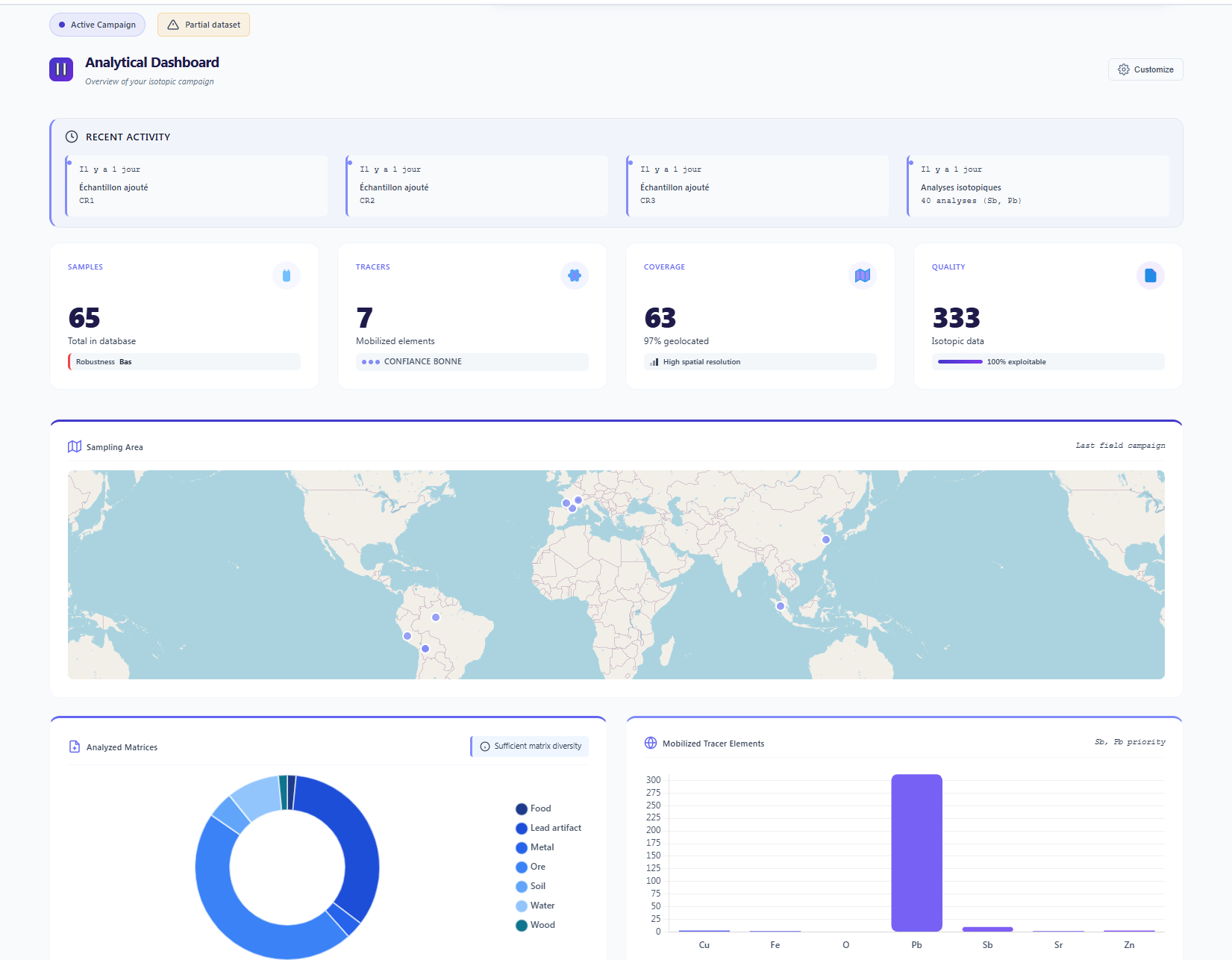 Figure 1: Main dashboard and mapping module.
The ISOF Standard
The ISOF format (Isotopic Open Format) does not merely store isotopic ratios. It encapsulates the complete analytical lineage: digestion protocols, purification yields and reference standards. The ECDSA P-256 signature makes this capsule tamper-proof, guaranteeing full traceability and admissibility during inter-laboratory exchanges.
Structure of a .isof file
Raw Data
Isotopic ratios, uncertainties
Analytical Metadata
Methods, yields, pipelines
Lab Certificate
ECDSA P-256 signature, IsoFind PKI
Reference Standards
NIST, IAEA, custom standards
To learn more about the format and its cryptographic signature, see the Digital Signatures section of this documentation.
Documentation Structure
The documentation is organised into five sections accessible from the sidebar:
| Section | Contents |
|---|---|
| Getting Started | Installation, initial configuration and first data import. |
| Core Platform | Database management, export, analytical methods, mapping, correspondence search, normalisation. |
| IsoFind Nexus | Isotopic fractionation modelling, workflows, fractionation databases, ML contextualisation. |
| Advanced Features | Security, users, licences, lab certificates, API, Python integration. |
| ISOF Standard | Digital signatures, integrity verification, open-source integration, .isof file creation. |
For first-time use, it is recommended to follow the Installation then Configuration sections before importing your first data.